Why AI Automation Pays Off Now for Small Businesses
Small businesses spend an average of 40% of their time on repetitive tasks: processing invoices, answering emails, data entry, document classification. In 2026, AI automation is no longer reserved for large corporations with massive IT budgets. With tools like n8n, OpenAI, and simple OCR services, any small business can automate these tasks for a fraction of the cost of hiring an additional employee. Model payback first with our automation ROI calculator or read the broader AI for small business guide.
The difference from traditional automation? AI can handle variation. Where old scripts would break on an invoice in a different format, an LLM recognizes the structure and extracts the correct data regardless of layout or language.
- Time savings: 5-15 hours per week on administrative tasks
- Error reduction: 90%+ fewer manual entry errors
- Scalability: Process 10x more documents without additional staff
- Faster turnaround: From days to minutes
The ROI Numbers That Matter
Let's calculate concrete numbers. An average small business spends 10 hours per week on invoice processing and email handling. At an hourly rate of $40, that's $400 per week, or $20,800 per year. Plug your own hours and rates into the ROI calculator for a tailored estimate.
| Scenario | Time Investment | Annual Cost | After Automation |
|---|---|---|---|
| Invoice processing (50/month) | 8 hrs/month | $3,840/year | 1 hr/month |
| Email triage (200/week) | 10 hrs/week | $20,800/year | 2 hrs/week |
| CRM data entry | 5 hrs/week | $10,400/year | 30 min/week |
| Document classification | 3 hrs/week | $6,240/year | 15 min/week |
Total potential savings: $35,000+ per year. The implementation cost for a typical AI automation stack ranges from $2,000 to $10,000 one-time, plus $50-200 per month in API costs. ROI: 300-500% in the first year.
Workflow 1: Automated Invoice Processing (OCR + LLM + Database)
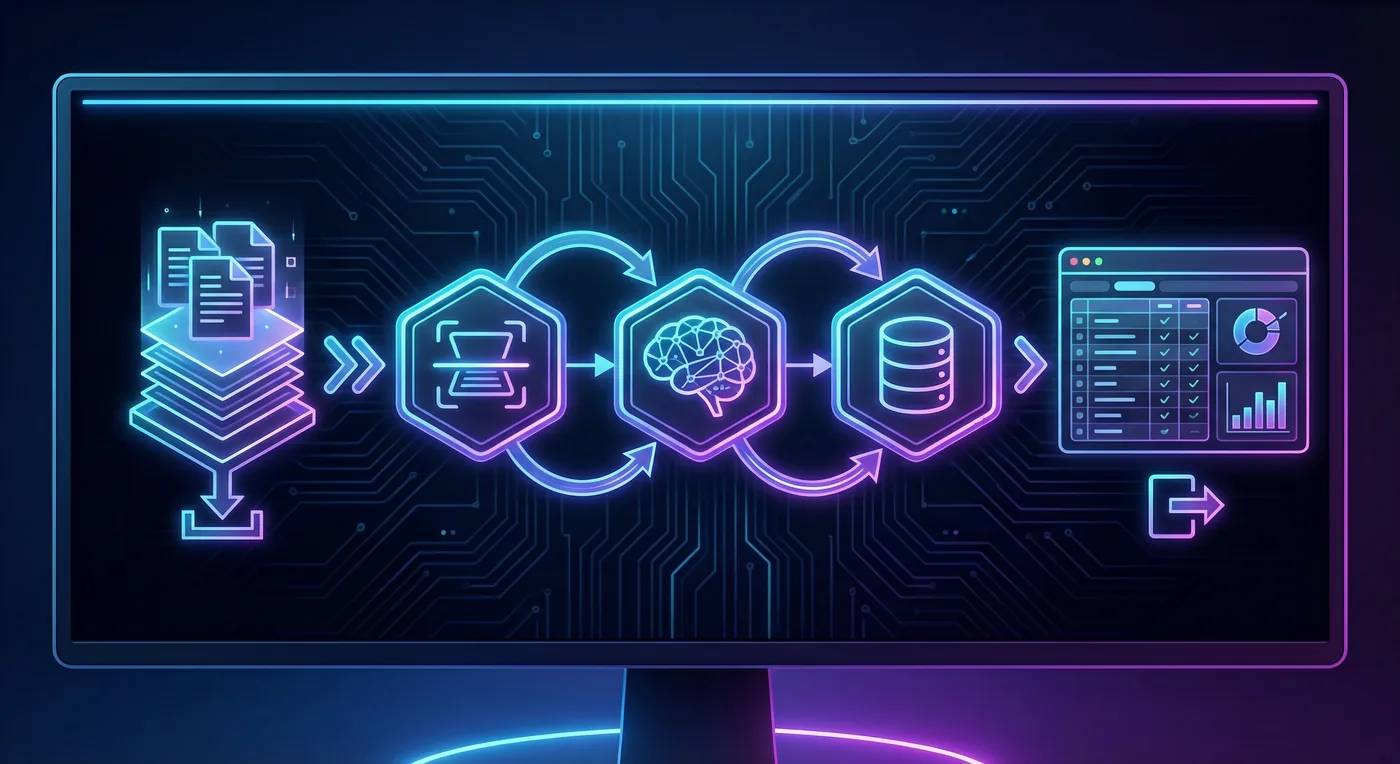
This is the highest-impact automation for most small businesses. Here's the workflow:
- Step 1 - Trigger: Invoice arrives via email or upload to cloud folder
- Step 2 - OCR extraction: Document is scanned and text extracted (e.g., via Google Vision, AWS Textract)
- Step 3 - LLM parsing: AI extracts structured data: vendor, amount, VAT, invoice number, due date
- Step 4 - Validation: Automatic check against known vendors and unusual amounts
- Step 5 - Database storage: Data is saved to your accounting system or spreadsheet
- Step 6 - Notification: Team receives alert for anomalies or approval requests
Real-world example: An HVAC installation company received 60 invoices per month. Manual processing took 12 hours monthly. After implementation: 45 minutes per month for exception review. Savings: 140+ hours per year.
Technical stack: n8n workflow automation with Gmail trigger, Google Vision OCR node, OpenAI node for parsing, Airtable or Google Sheets for storage. TecAdRise builds and maintains these pipelines from €150 per workflow.
Workflow 2: Intelligent Email Classification and Routing
Email is the biggest time waster for many small businesses. With AI classification, you can:
- Automatically categorize incoming emails: sales lead, support question, invoice, spam, internal
- Determine urgency based on content and sender
- Automatically route to the right person or department
- Generate draft responses for standard questions
- Extract action items and create tasks in your project management tool
The workflow in detail:
- Step 1 - Email arrival: New email triggers the workflow
- Step 2 - AI classification: LLM analyzes subject and content, determines category and urgency
- Step 3 - Routing: Email is forwarded to the correct inbox or person
- Step 4 - Draft response: For standard questions, AI generates a draft reply
- Step 5 - Task creation: Action items automatically become tasks in Trello/Asana/Notion
Result: A consulting firm with 200 emails per day reduced email triage time from 2 hours to 20 minutes. Sales leads are now forwarded within 5 minutes instead of potentially hours.
Step-by-Step Implementation
How do you get started? Follow this proven path:
- 1. Audit your processes: Measure how much time you spend on repetitive tasks. Which have the highest frequency and time investment?
- 2. Choose one workflow: Start with the task that has the highest ROI potential. Usually invoice processing or email triage.
- 3. Select your tools: n8n for workflow orchestration, OpenAI/Claude for LLM, Google Vision/AWS Textract for OCR.
- 4. Build an MVP: Implement the basic flow without all edge cases. Test with real data.
- 5. Measure and optimize: Track time spent before and after. Identify exceptions and improve prompts.
- 6. Scale up: Add more workflows once the first one runs stable.
Typical timeline: 2-4 weeks for a fully working invoice processing workflow, 1-2 weeks for email classification.
Common Mistakes and How to Avoid Them
- Automating too much at once: Focus on one workflow, perfect it, then move on.
- No error handling: Plan for edge cases. What if OCR fails? What if the LLM is uncertain?
- No human review: Always keep a human review step for critical processes.
- Underestimating API costs: Test with small volume first. OpenAI costs can add up quickly at high volumes.
- Ignoring data privacy: Ensure sensitive data doesn't go to external APIs without encryption or filtering.
Conclusion: Start Today
AI automation is no longer future music for small businesses. The tools are mature, the costs are low, and the ROI is measurable. An invoice processing workflow can be running within two weeks and immediately saves 10+ hours per month.
The key is to start small, automate one process, and expand once you see results. Don't wait until your competitor does it.
At TecAdRise, we implement AI automation workflows for small businesses. From invoice processing to complete customer service automation, we build solutions that deliver immediate ROI. See n8n workflow automation and AI voice agents for service details and pricing. Compare agency vs DIY automation if you are weighing build vs buy.
Resources
Ready to Boost Your ROI?
Contact us for a free workflow audit. We'll analyze your processes and show where AI automation has the biggest impact. Start with the ROI calculator or n8n workflow automation service page.
Schedule a Call