Why OpenClaw Security Matters
OpenClaw has become one of the most popular open-source AI orchestration platforms, offering powerful features for building and deploying AI applications. However, with great power comes great responsibility. Self-hosted deployments put security entirely in your hands, and mistakes can expose sensitive data, compromise your infrastructure, or give attackers access to your AI models and the data they process.
Unlike managed cloud services that handle security configurations automatically, self-hosted OpenClaw requires deliberate security hardening. Many organizations rush to get their AI applications running and overlook critical security measures. This article covers the most common security mistakes we see in the field and provides actionable fixes for each one.
Whether you are running OpenClaw for internal tools, customer-facing applications, or processing sensitive business data, understanding these vulnerabilities is essential. A single misconfiguration can lead to data breaches, unauthorized access to AI capabilities, or complete system compromise.
Mistake 1: Default Credentials
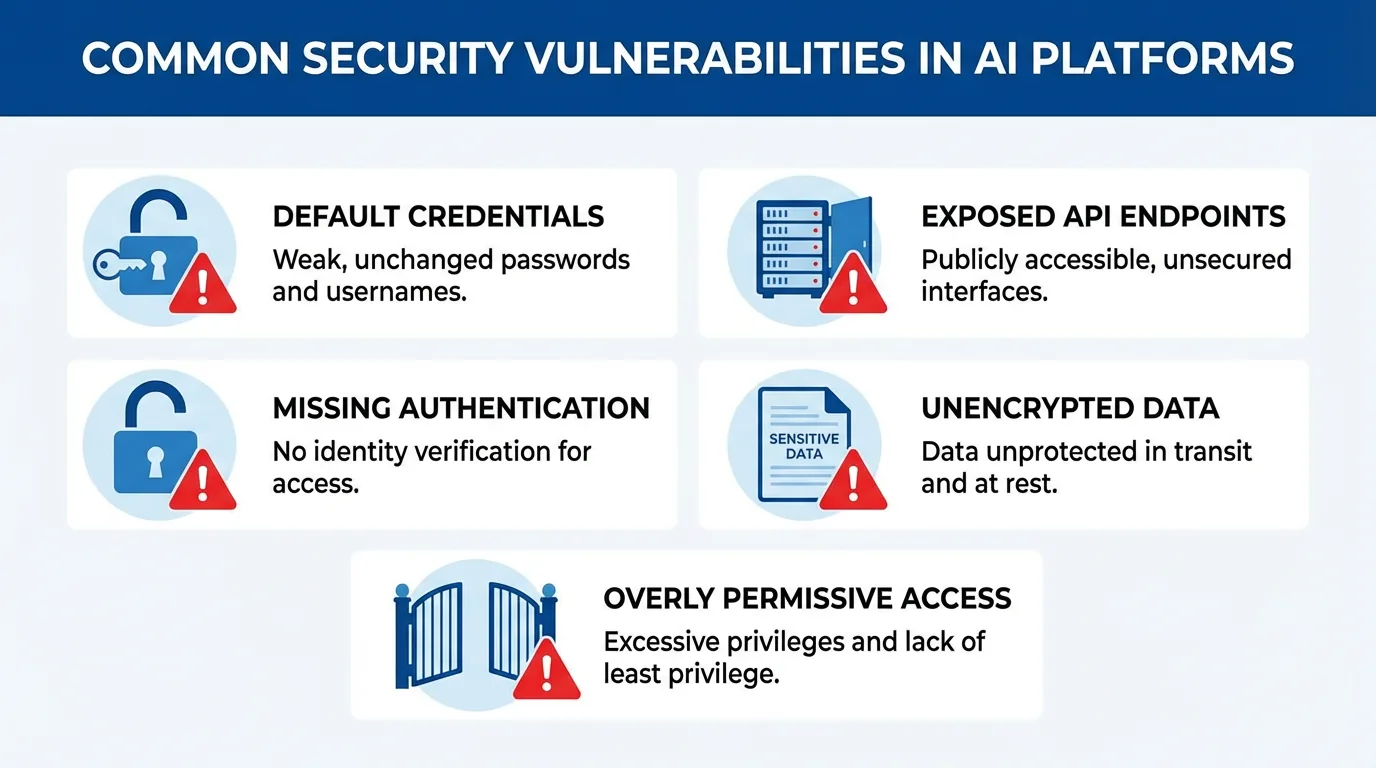
The most common and easily exploited vulnerability is leaving default credentials in place. OpenClaw ships with default admin passwords and API keys that are publicly documented. Attackers know these defaults and actively scan for exposed instances using them.
Default credentials expose you to:
- Full admin access: Attackers can create accounts, modify configurations, and access all data.
- API abuse: Default API keys allow unauthorized use of your AI models, potentially running up costs or accessing sensitive outputs.
- Lateral movement: Once inside, attackers can pivot to connected systems like databases, model backends, or internal networks.
How to Fix
Change all default credentials immediately after installation:
# Change admin password
openclaw user password admin --new-password "$(openssl rand -base64 32)"

# Regenerate API keys
openclaw api-key regenerate --all

# Update environment variables
export OPENCLAW_SECRET_KEY="$(openssl rand -hex 32)"
export OPENCLAW_JWT_SECRET="$(openssl rand -hex 32)"
Store credentials securely using a secrets manager like HashiCorp Vault, AWS Secrets Manager, or at minimum encrypted environment files that are not committed to version control.
Mistake 2: Exposed API Endpoints
Many deployments expose OpenClaw API endpoints directly to the internet without proper access controls. This allows anyone to interact with your AI models, potentially extracting sensitive information or abusing compute resources.
Exposed APIs enable:
- Prompt injection attacks: Crafted inputs that manipulate AI behavior or extract training data.
- Resource exhaustion: Attackers can run expensive queries, overwhelming your infrastructure or generating massive bills.
- Data exfiltration: If your RAG pipeline contains sensitive documents, attackers can query for confidential information.
How to Fix
Never expose OpenClaw APIs directly to the public internet. Use a reverse proxy with authentication:
# Nginx configuration with basic auth
server {
    listen 443 ssl;
    server_name openclaw.yourdomain.com;

    # Require authentication for API endpoints
    location /api/ {
        auth_basic "OpenClaw API";
        auth_basic_user_file /etc/nginx/.htpasswd;
        proxy_pass http://localhost:8080;
    }

    # Or better: use OAuth/OIDC
    location /api/ {
        auth_request /auth;
        proxy_pass http://localhost:8080;
    }
}
For internal applications, restrict API access to specific IP ranges or require VPN connection. Implement rate limiting to prevent abuse even from authenticated users.
Mistake 3: Missing SSL/TLS
Running OpenClaw over plain HTTP exposes all traffic to interception. This includes authentication tokens, API keys, queries sent to AI models, and the responses containing potentially sensitive information.
Without encryption:
- Credential theft: Login sessions and API keys can be captured by anyone on the network path.
- Data interception: AI queries and responses are visible to attackers performing man-in-the-middle attacks.
- Session hijacking: Stolen session tokens allow attackers to impersonate legitimate users.
How to Fix
Always use HTTPS with valid certificates. Let's Encrypt provides free certificates that auto-renew:
# Install certbot and obtain certificate
sudo apt install certbot python3-certbot-nginx
sudo certbot --nginx -d openclaw.yourdomain.com

# Force HTTPS redirect in Nginx
server {
    listen 80;
    server_name openclaw.yourdomain.com;
    return 301 https://$server_name$request_uri;
}
Also encrypt internal traffic between OpenClaw components. If your database or vector store is on a separate server, use TLS for those connections as well.
Mistake 4: Weak Authentication
Basic username and password authentication without additional protections is insufficient for AI platforms handling sensitive data. Weak authentication allows brute force attacks, credential stuffing, and account takeover.
Weak authentication risks:
- Brute force attacks: Automated tools can try thousands of password combinations.
- Credential stuffing: Attackers use leaked credentials from other breaches to access your system.
- No accountability: Without proper authentication, you cannot track who performed what actions.
How to Fix
Implement multi-factor authentication and integrate with your identity provider:
# OpenClaw configuration for OIDC
authentication:
  provider: oidc
  oidc:
    issuer: https://your-idp.com
    client_id: openclaw-app
    client_secret: {OIDC_CLIENT_SECRET}
    scopes: ["openid", "profile", "email"]

# Enable MFA requirement
security:
  require_mfa: true
  session_timeout: 3600
  max_failed_attempts: 5
Use Single Sign-On (SSO) with your corporate identity provider. This centralizes authentication, enables MFA, and provides automatic deprovisioning when employees leave.
Mistake 5: No Firewall Rules
Deploying OpenClaw without firewall rules exposes all ports to the internet. This includes not just the web interface but also database ports, admin interfaces, and internal services that should never be publicly accessible.
Open ports expose:
- Database access: Attackers can directly connect to your database, bypassing application security.
- Admin interfaces: Management ports for Redis, PostgreSQL, or vector databases are accessible.
- Internal services: Model serving endpoints, queue systems, and monitoring tools become attack targets.
How to Fix
Configure strict firewall rules that only allow necessary traffic:
# UFW firewall configuration
sudo ufw default deny incoming
sudo ufw default allow outgoing

# Allow only HTTPS and SSH
sudo ufw allow 443/tcp
sudo ufw allow 22/tcp

# Allow internal network for database (example)
sudo ufw allow from 10.0.0.0/8 to any port 5432

sudo ufw enable
Use network segmentation to isolate OpenClaw components. Place databases and internal services on private networks with no direct internet access.
Mistake 6: Unencrypted Data at Rest
Even with network encryption, data stored on disk remains vulnerable if not encrypted. Server compromises, stolen backups, or decommissioned hardware can expose all your AI data, including embeddings, conversation history, and RAG documents.
Unencrypted storage risks:
- Backup exposure: Stolen or leaked backups reveal all historical data.
- Physical access: Anyone with server access can read data directly from disk.
- Compliance violations: Many regulations require encryption at rest for sensitive data.
How to Fix
Enable encryption for all data storage:
# PostgreSQL with encryption
postgresql:
  ssl: true
  encryption:
    enabled: true
    key_file: /etc/openclaw/db-encryption.key

# Encrypted backups
backup:
  encryption: aes-256-gcm
  key_source: vault

# Vector database encryption
qdrant:
  storage:
    encryption:
      enabled: true
Use full-disk encryption on servers and encrypted storage volumes. For cloud deployments, enable provider-managed encryption keys or bring your own keys for additional control.
Mistake 7: Missing Audit Logs
Without comprehensive logging, you cannot detect attacks, investigate incidents, or demonstrate compliance. Many deployments either disable logging for performance or fail to protect and monitor log data.
Missing logs prevent:
- Attack detection: Unusual patterns and security events go unnoticed.
- Incident response: Without logs, you cannot determine what happened or what data was accessed.
- Compliance audits: Regulations often require detailed access logs and retention policies.
How to Fix
Enable comprehensive audit logging and forward to a secure logging system:
# OpenClaw logging configuration
logging:
  level: info
  audit:
    enabled: true
    include:
      - authentication
      - api_calls
      - admin_actions
      - data_access

  # Forward to centralized logging
  outputs:
    - type: syslog
      host: logs.yourdomain.com
      port: 514
    - type: elasticsearch
      host: https://elk.internal:9200
Set up alerting for security-relevant events like failed login attempts, unusual API usage patterns, or admin actions. Retain logs according to your compliance requirements, typically 90 days to 7 years depending on regulations.
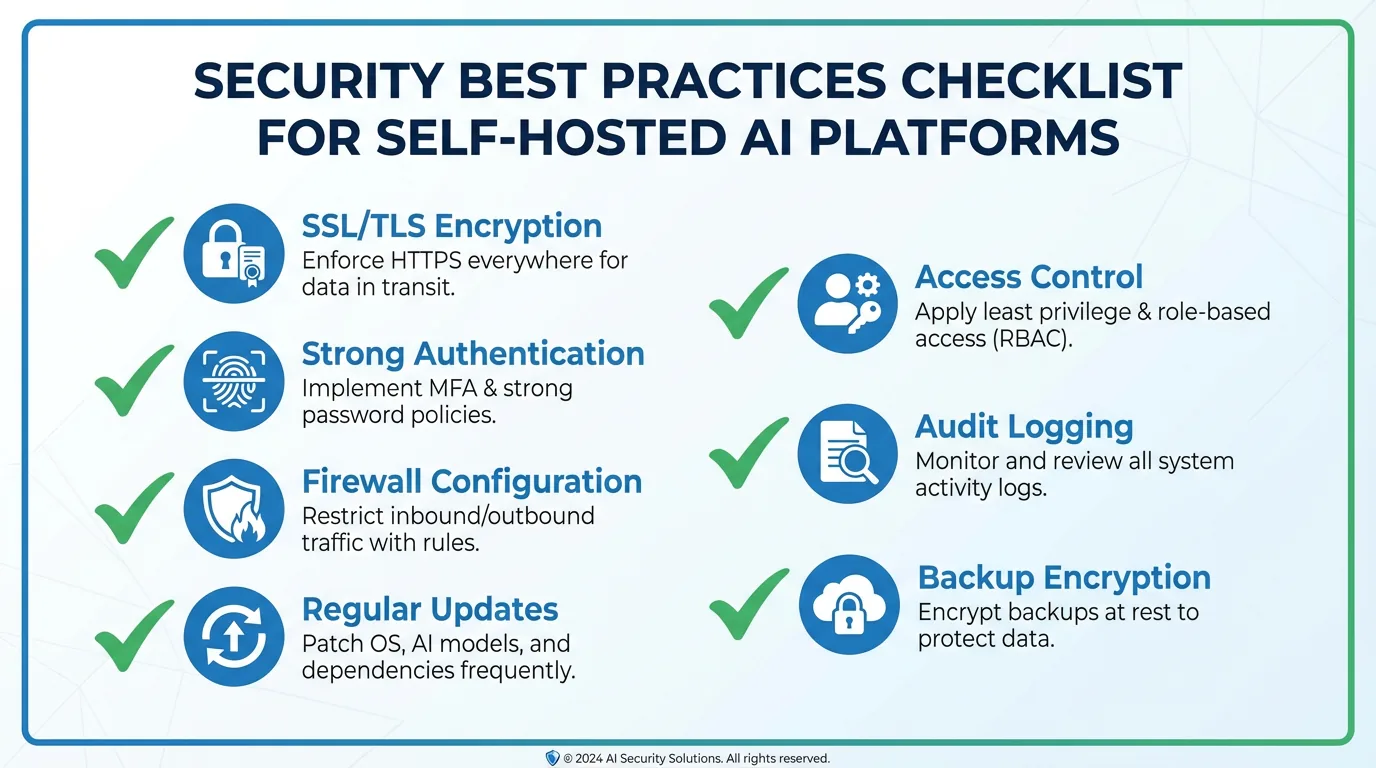
Security Checklist
Use this checklist before deploying OpenClaw to production:
- Credentials: All default passwords and API keys changed. Secrets stored in a secrets manager.
- Network: HTTPS enabled with valid certificates. HTTP redirects to HTTPS. Internal services not exposed.
- Authentication: SSO/OIDC configured. MFA enabled. Session timeouts set.
- Firewall: Only required ports open. Database and admin interfaces restricted to internal networks.
- Encryption: Data encrypted at rest. Backups encrypted. Database connections use TLS.
- Logging: Audit logging enabled. Logs forwarded to secure storage. Alerts configured for security events.
- Updates: Automatic security updates enabled. Regular patching schedule established.
- Access control: Least privilege principle applied. Role-based access configured. Regular access reviews scheduled.
Conclusion
Securing a self-hosted OpenClaw deployment requires attention to multiple layers: network security, authentication, encryption, and monitoring. The mistakes covered in this article are common because they are easy to overlook in the rush to deploy, but each one represents a significant risk to your organization.
The good news is that all of these issues are fixable with standard security practices. The key is to treat security as a first-class requirement from the start, not an afterthought. Build security into your deployment process, automate security checks, and regularly audit your configuration.
At TecAdRise, we specialize in secure AI infrastructure deployments. From initial security architecture to ongoing monitoring and compliance, we help organizations deploy OpenClaw and other AI platforms without compromising security. Our team can audit your existing deployment, implement security hardening, or build a secure architecture from scratch.
Resources
Need Help Securing Your OpenClaw Deployment?
Contact TecAdRise for a security assessment of your AI infrastructure. We will identify vulnerabilities and implement fixes to protect your data and systems.
Get Started