The Root Cause of Every Multi-Agent Breakdown
You've built something impressive: a multi-agent pipeline that researches, analyzes, writes, and publishes. It works in testing. You demo it to the team. Everyone is amazed. Then you push it to production, and within 48 hours, it's doing something nobody asked for. Your analyst agent writes reports. Your writer agent pulls data. Your orchestrator talks directly to users.
Everything is technically functional, and yet everything is wrong.
The root cause, almost every time, is the same: nobody told the agents who they were, what they could do, where they fit, or how they should behave. The agents were brilliant but unsupervised, like hiring a team of genius contractors and forgetting to give them job descriptions.
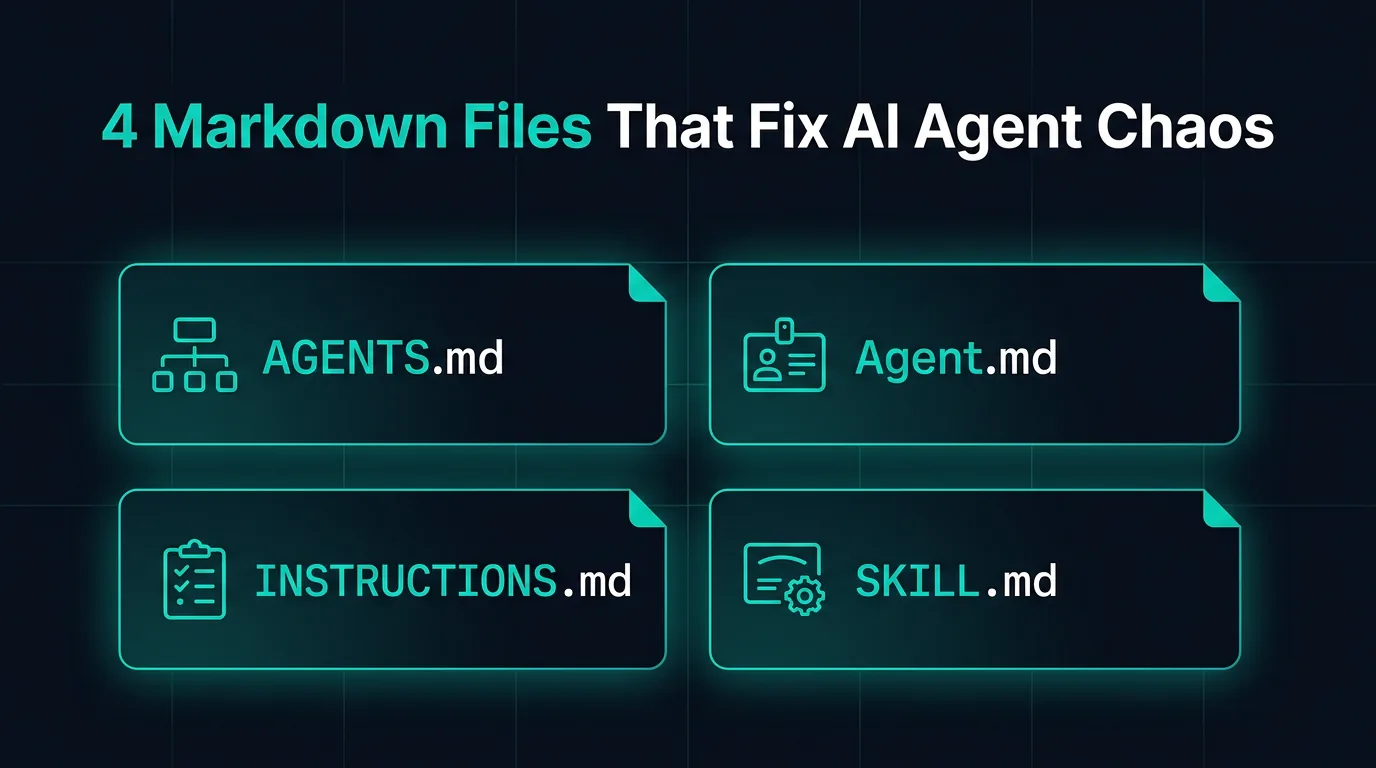
The fix turns out to be four simple markdown files. Not new frameworks, not more prompts, just four files, each answering one specific question.
Why One Giant System Prompt Breaks Down
Most teams start the same way: one sprawling system prompt per agent that describes personality, tools, rules, role, and output format all in one place. It works at first. Then it breaks in strange ways. The agent ignores half the prompt because it is too long. It hallucinates rules that were never there. It starts doing things that made sense in isolation but clash with what another agent expects downstream.
The root issue is that one system prompt tries to answer four fundamentally different questions at once:
- What can this agent do?
- Who is this agent in the system?
- Where does it fit among all other agents?
- How should it behave, step by step?
When those four questions live in the same blob of text, agents treat them all with equal weight, or worse, they mush them together into something incoherent. The solution is to give each question its own file.
SKILL.md: The Training Manual
A SKILL.md file answers: "How do I actually do this specific thing?"
Think of it as a certification document. If you hire a data engineer, you expect them to know SQL. The SKILL.md is the proof and the reference for exactly that knowledge. Here is what a real example looks like for a web scraping agent:
---
name: web-scraper
description: Extracts structured data from websites using
             BeautifulSoup and Playwright.
---

## When to use this skill
- User provides a URL and wants structured data back
- Page may be JS-rendered (use Playwright) or static (use requests)

## Step-by-step process
1. Check if the page is JS-rendered. If yes, use Playwright headless.
2. Prefer semantic selectors: article, main, role= attributes.
   Avoid brittle CSS paths like .div > span:nth-child(3).
3. Return a pandas DataFrame. Save to /outputs/data.csv.

## Error handling
- 403 or 429: Add User-Agent header, add 2-second delay, retry once.
- Empty results: Log the selector used. Suggest an alternative.
Notice what is here: real code patterns, explicit steps, and failure modes. The best SKILL.md files do not just describe sunny-day scenarios. They tell the agent exactly what to do when things go wrong.
Best practice: One SKILL.md per capability. Do not bundle "scraping" and "database querying" into one file. Keep skills atomic and reusable. Other agents should be able to pick up the same skill file without modification.
Agent.md: The Employee Badge
Agent.md answers: "Who am I, and where do I fit in the system?"
This is a per-agent file. Each agent has exactly one. It is short, rarely more than 30 lines, because it is not trying to teach the agent anything. It is grounding the agent in its identity:
## analyst-agent

### Who I am
I am the data analyst agent. I receive datasets and questions,
and I return structured AnalysisResult dicts.

### My place in the system
- Spawned by: orchestrator-agent
- I hand off to: viz-agent and writer-agent
- I never communicate directly with the user

### My capabilities
- Pandas / NumPy analysis
- SQL queries via the query_database tool
- Outlier detection and trend identification

### What I do NOT do
- Write reports or prose (-> writer-agent)
- Build charts or visualizations (-> viz-agent)
- Make business recommendations (-> human review)
That last section, "What I do NOT do", is the most important part of any Agent.md. Agent misbehavior almost always comes from an agent filling in a gap that was never explicitly closed. If the analyst agent is not told it does not write reports, it will eventually decide to write one, because writing a report after analysis seems like a natural next step.
Best practice: Keep Agent.md stable. It should almost never change once written. If you find yourself editing it frequently, that is a sign the agent's role is not well-defined yet. Fix the system design, not the file.
AGENTS.md: The Org Chart
If Agent.md is one employee's badge, AGENTS.md is the company directory. It answers: "Who are all the agents, and how does the whole system connect?"
This is a single file that lives at the root of your project, not inside any one agent's folder. It gives every agent a mental model of the entire system, not just their corner of it. When the analyst agent knows a viz-agent exists downstream, it naturally starts thinking about what format its output should be in. It stops optimizing just for itself.
# System Agents

## orchestrator-agent
Role: Receives user requests, routes tasks, aggregates outputs
Spawns: analyst-agent, writer-agent, viz-agent
Tools: task_router, memory_read, memory_write

## analyst-agent
Role: Receives datasets, returns AnalysisResult dicts
Reports to: orchestrator-agent
Hands off to: viz-agent, writer-agent

## writer-agent
Role: Transforms analysis into structured prose reports
Reports to: orchestrator-agent
Never: accesses raw data, calls external APIs

## viz-agent
Role: Renders charts from AnalysisResult dicts
Reports to: orchestrator-agent
Output: PNG file paths
Best practice: Treat AGENTS.md like an architecture diagram. Keep it at the project root, commit it to version control, and update it whenever you add or remove an agent. A new engineer joining the project should be able to read this file and understand the entire system in five minutes.
INSTRUCTIONS.md: The Employee Handbook
INSTRUCTIONS.md answers: "How should I behave, step by step, when doing my job?"
This is the most operational of the four files. Where SKILL.md says "here is how to scrape a page," INSTRUCTIONS.md says "here is the exact sequence you follow every time a task arrives."
## Instructions: Data Analyst Agent

### Core behavioral rules
1. Always validate the dataset before analyzing.
   - More than 20% nulls in any column? Warn the user.
   - Type mismatches vs. expected schema? Raise an error, do not guess.

2. Never hallucinate statistics.
   If a computation returns NaN or fails, say so explicitly.
   Do not estimate or fill in numbers from memory.

3. Be concise in summaries. Three sentences maximum.

### Exact workflow
1. Load the dataset. Log its shape and column types.
2. Run data quality checks (nulls, duplicates, type mismatches).
3. Answer the analytical question using code only, no guessing.
4. Populate the AnalysisResult dict.
5. Hand off to the downstream agent immediately.
   Do NOT ask the user for confirmation.

### Hard constraints
- Never read files outside /mnt/user-data/
- Never make external HTTP calls
- If analysis takes more than 30 seconds, time out and report why
That explicit numbered workflow is what separates good INSTRUCTIONS.md files from bad ones. Prose instructions get interpreted loosely. Numbered steps get followed precisely. When you are debugging an agent that is doing something unexpected, a numbered workflow gives you an exact place to look: which step did it skip?
Best practice: Separate behavioral rules from workflow steps. Rules answer "always/never." Workflows answer "first/then/finally." Mixing them creates ambiguity about which takes priority.
How the 4 Files Work Together
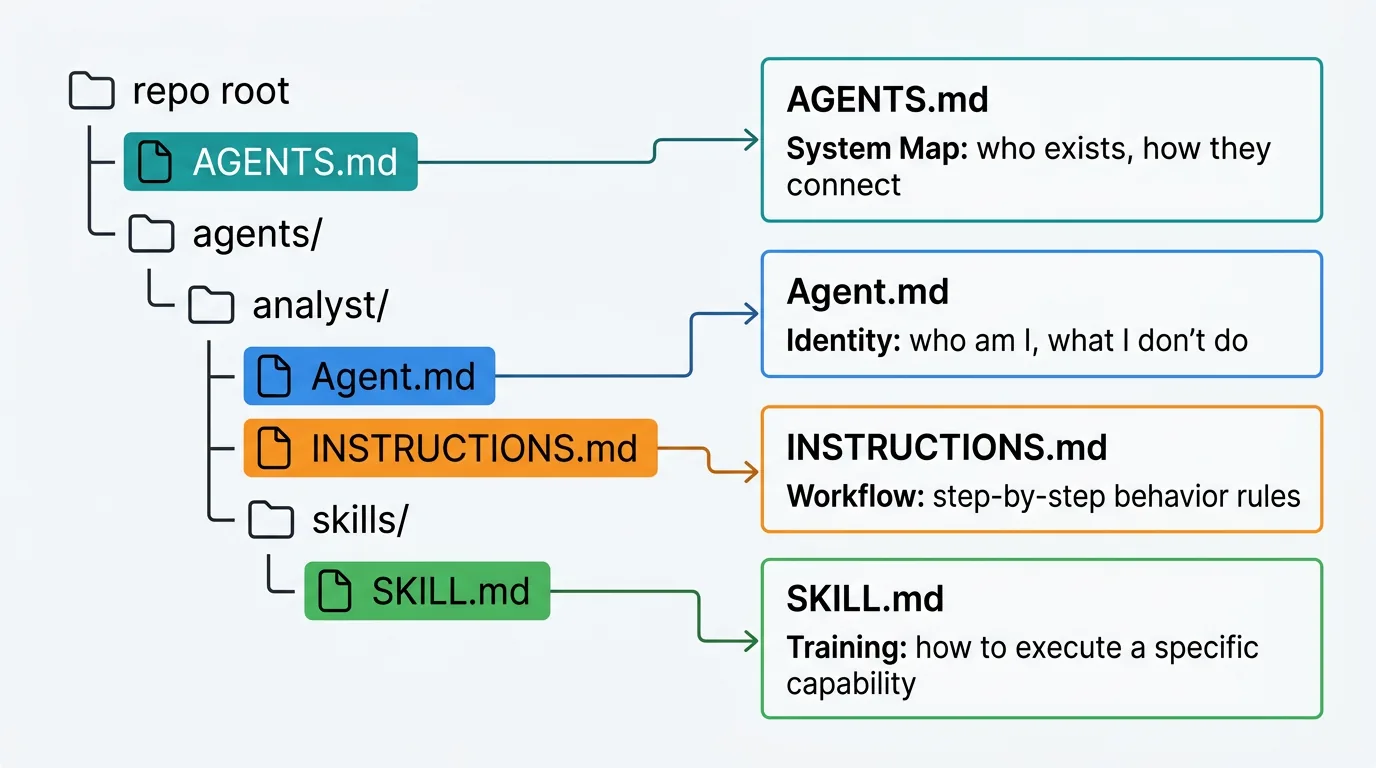
Here is the folder structure used on every multi-agent project following this pattern:
repo/
├── AGENTS.md              <- System map. Who exists. How they connect.
└── agents/
    └── analyst/
        ├── Agent.md       <- I am analyst-agent. I report to orchestrator.
        ├── INSTRUCTIONS.md <- Step 1: validate. Step 2: compute. Never hallucinate.
        └── skills/
            └── SKILL.md   <- Here is exactly how to run pandas analysis.
The mental model to keep in mind: AGENTS.md is the city map. Agent.md is your apartment address. INSTRUCTIONS.md is your daily routine. SKILL.md is your job training certificate.
- AGENTS.md (city map): Without it, agents have no idea how their work connects to the rest of the system.
- Agent.md (apartment address): Without it, agents drift into roles that feel natural but were never intended.
- INSTRUCTIONS.md (daily routine): Without it, agents interpret "do the job" in inconsistent, unpredictable ways.
- SKILL.md (training certificate): Without it, agents attempt capabilities with no guidance on how to execute or recover from failure.
A city map without apartment addresses is useless at scale. An apartment without a daily routine produces chaos. A routine without training produces confident incompetence. You need all four.
The Files Most Teams Skip
Most teams write SKILL.md and INSTRUCTIONS.md fairly naturally. They emerge from prompt engineering work that teams are already doing. What teams consistently skip are Agent.md and AGENTS.md, because they feel administrative.
"We know who the agents are," teams say. "We do not need to document that."
But agents do not know what you know. Every time a new conversation starts, every agent begins from scratch. Without Agent.md, your analyst agent does not know it is the analyst. It knows it has pandas tools and some instructions. Given enough latitude, it will define its own role, and that role will be whatever feels most natural given the task at hand. Some days that is fine. Some days your analyst starts writing CEO memos.
The Real Cost of Skipping Identity Files
- Role drift: Agents gradually expand into adjacent tasks, blurring responsibilities across the system.
- Output format mismatches: Agent A produces something that Agent B cannot parse, because neither knew what the other expected.
- Cascading failures: One agent doing the wrong thing causes a chain of downstream errors that are almost impossible to trace without a system map.
- Onboarding cost: Every new engineer has to reverse-engineer the entire system from prompts and logs instead of reading one file.
The four-file structure costs maybe two hours to set up for a new agent. The bugs it prevents cost days.
Conclusion
Multi-agent systems fail not because the models are bad, but because nobody gave the agents a clear organizational structure. Four markdown files solve this completely: one for the system map, one for identity, one for step-by-step behavior, and one for reusable skills.
If you are building any system with more than two agents, add these files before you write a single line of agent code. The structure you define upfront is the structure your agents will operate within. Without it, they will invent their own, and the results will surprise you.
Resources
Need a Structured AI Agent System for Your Business?
TecAdRise builds multi-agent pipelines with proper structure, clear role definitions, and production-ready architecture. No chaos, no surprises.
Talk to TecAdRise