Why This List Matters
A popular thread made the rounds claiming there are thirty MCP servers that can make Claude dramatically more useful. That headline is directionally right, but the practical question is not whether thirty tools exist. The real question is which few are actually worth installing first.
MCP, Model Context Protocol, is becoming the standard way to expose tools and data to Claude, Cursor, and other AI clients without writing custom integrations for every app. The upside is obvious: file access, GitHub actions, browser control, database queries, SaaS operations, and memory systems can all show up as structured tools instead of copy paste busywork.
This is our practical shortlist of the top 30 MCP servers for Claude in 2026. It is not a random directory dump. It is the set we would actually evaluate for client work, internal agent stacks, and serious builder workflows. Most users should still start with only 3 to 6 servers, then expand once the workflow proves its value.
What MCP Servers Actually Do
An MCP server exposes tools, resources, or both, to an AI assistant in a machine-readable way. Instead of telling Claude “pretend you can read this repo” or “imagine you can click this button,” you connect a server that gives the model real actions with real schemas and controlled permissions.
- Files and code: read, write, diff, search, commit, open pull requests
- Browser and research: search the web, scrape docs, click through product UIs, capture page state
- Databases and infra: query tables, inspect logs, manage hosted backends, validate production state
- Work apps: create tasks, answer Slack threads, search Notion, move content in Drive, update tickets
- Memory and knowledge: persist decisions, retrieve prior context, and build compounding agent workflows
The best MCP servers do two things well: they remove manual glue work, and they reduce hallucination by giving the model a precise, executable interface.
How We Picked the 30
We weighted the list around practical leverage, not novelty. A flashy server that looks good in a demo but rarely survives real daily use does not belong near the top.
- Workflow leverage: does it unlock work people repeat every day?
- Reliability: is the server mature enough to trust for real tasks?
- Setup friction: can a motivated builder get value in one sitting?
- Safety: can you scope access cleanly, preferably with read-only or narrow credentials first?
- Composability: does it combine well with the other servers most teams already need?
That is why “boring” servers like Filesystem, GitHub, PostgreSQL, Slack, and Notion keep showing up. They create leverage immediately, and they compound when used together.
The Category Map
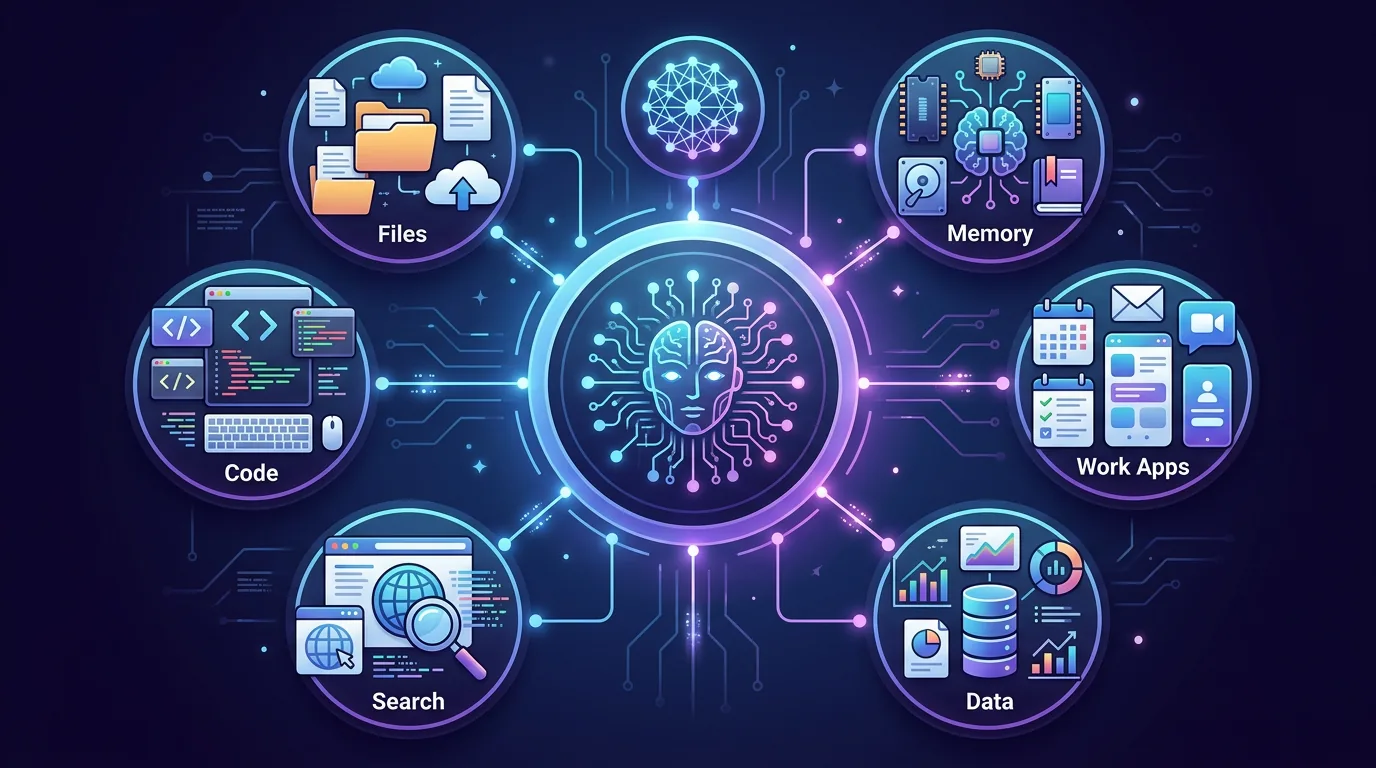
We group the ecosystem into six practical buckets: files, code, browser and search, data, work apps, and memory. If your stack is missing one of these buckets, you usually feel it fast. For example, code-only stacks often stall without browser automation, and SaaS-heavy stacks become brittle without memory or database access.
A healthy starter setup usually covers at least three buckets: one for your source of truth, one for execution, and one for communication or memory.
The Top 30 MCP Servers
The order below is intentionally practical. The first ten are the ones we would look at for most technical users first. The rest become valuable as your workflow gets more specialized.
1. Files and Code
2. Browser and Research
3. Data and Infrastructure
4. Productivity and Operations
5. Design and Business Apps
6. Memory, Support, and Analytics
Starter Stacks
Do not install all thirty on day one. Most teams get faster results from one focused bundle than from a bloated toolbox.
| Use case | Suggested stack | Why this combo works |
|---|---|---|
| Solo builder | Filesystem, GitHub, Brave Search, Playwright | Covers coding, current docs, browser validation, and repo collaboration with minimal overhead. |
| SaaS operator | GitHub, Supabase, Stripe, Slack, Sentry | Gives one agent visibility into product, backend, billing, communication, and incident response. |
| Knowledge-heavy team | Google Workspace CLI, Notion, Memory, Box | Strong mix for documents, email, shared knowledge, and persistent organizational context. |
If you want a deeper example of what a real office workflow stack looks like, read our breakdown of the Google Workspace CLI for AI agents. If memory is the bottleneck, pair this article with our MemPalace write-up.
Security Checklist Before You Install Anything
MCP is powerful precisely because it reaches real systems. That means careless installs can create very real blast radius.
- Read the source or at least audit the docs first. Know what the server can read, write, and send out over the network.
- Start with narrow credentials. Read-only database users and scoped API tokens beat admin keys every time.
- Prefer a staged rollout. Add one server, test a real workflow, then decide if the next server is justified.
- Keep risky systems separate. Billing, production infra, and customer data deserve tighter isolation than a personal note vault.
- Log what the agent did. Good MCP usage should be inspectable after the fact, not hidden behind “the AI changed something.”
The best MCP stack is not the biggest one. It is the smallest set of tools that lets the agent complete the workflow safely.
Conclusion
The top thirty MCP servers matter because they turn AI assistants into real operators across code, data, browser tasks, work apps, and memory. But the biggest productivity jump rarely comes from installing all thirty. It comes from choosing the right three to six for the exact bottleneck in front of you.
If your world is code-heavy, start with Filesystem, GitHub, and Playwright. If your world is operations-heavy, start with Slack, Google Workspace CLI, and one data source. If your world is fragmented across conversations and docs, prioritize memory first. The protocol is the enabler, but the workflow choice is what creates actual leverage.
Need help picking and wiring MCP servers for a production workflow? TecAdRise builds custom AI agents and n8n automations so your stack is the smallest set that actually ships.
Resources
Need the Right MCP Stack, Not the Biggest One?
We help small teams choose, connect, and harden AI workflows around the tools they already use. See custom AI agents and Agent-OS vs n8n for how we combine agents with workflows.
Request a Demo